Skip to content
Hot News

Panasonic Lumix S 24-60mm F2.8 (S-E2460) lens review

How to Stack Presets in Lightroom Classic

Panasonic Lumix S 24-60mm F2.8 (S-E2460) lens specs

Panasonic Lumix S 40mm F2 (S-S40) lens review

Panasonic Lumix S 40mm F2 (S-S40) lens additional sample photographs

Panasonic Lumix S 40mm F2 (S-S40) lens sample photographs

The Digital Journal of Photography

Expert Reviews for Serious Photographers

  • About
  • Privacy Policy
  • Cookie Policy (UK)
  • Reviews
    • Lens Reviews
    • Camera Reviews
    • Accessories
    • Software
  • Practice
    • Features
    • Adobe Lightroom
    • Canon EOS R5 User Guide
    • Lens Database
  • Log In
  • Subscribe
  • Shop
Menu
  • Reviews
    • Lens Reviews
    • Camera Reviews
    • Accessories
    • Software
  • Practice
    • Features
    • Adobe Lightroom
    • Canon EOS R5 User Guide
    • Lens Database
  • Log In
  • Subscribe
  • Shop
Tuesday, June 9, 2026
Home / Articles

Articles

Sub Categories:FeaturesCapture One ProHidden Features of Capture OneTutorialsCanon EOS R5 User GuideCapture One Pro
Lightoom icon on a black background
  • Features

What are the benefits of Virtual Copies in Lightroom?

Virtual copies are commonly used in Adobe Lightroom, although their usage may vary among different photographers and workflows. Here are some reasons why many Lightroom users find virtual copies benef...

Kevin Carter
July 21, 2025
Read More
Lightoom icon on a black background
  • Features

Organise photos in Lightroom using Collections

Adobe Lightroom Classic is unique in that it doesn’t use Albums but adopts something similar called Collections. Collections in Adobe Lightroom (both Classic and the cloud-based version) are a g...

Kevin Carter
July 18, 2025
Read More
Canon EOS R5 no lens and shutter open revealing the 45 MP CMOS
  • Features

Setting up Back-button AF on the Canon EOS R5

By following these steps, you will be able to set up Back-button AF operation on the Canon EOS R5. This guide has been written specifically for the Canon EOS R5; however, the operation will be similar...

Kevin Carter
July 17, 2025
Read More
Canon EOS R5 no lens and shutter open revealing the 45 MP CMOS
  • Features

Setting up AF shortcuts on the Canon EOS R5

By following these steps, you will be able to set AF operation shortcuts to customisable buttons on the Canon EOS R5 (this guide has been written specifically for the Canon EOS R5, however, the operat...

Kevin Carter
July 16, 2025
Read More
Canon EOS R5 no lens and shutter open revealing the 45 MP CMOS
  • Features

Setting playback in the viewfinder of the Canon EOS R5

By following these steps, you will be able to set and view playback in the Canon EOS R5’s viewfinder. To set playback in the viewfinder of the Canon EOS R5, follow these steps: 1. Turn on the Ca...

Kevin Carter
April 25, 2025
Read More
Noct Nikkor on a white background.
  • Aperture Values
  • Features
  • News

Aperture values for comparison of lens speed

Comparing maximum aperture values in third- and half-stops can be challenging, so I’ve created a table to facilitate this comparison. Below F1.0, the differences become even more complex, so please co...

Kevin Carter
June 7, 2024
Read More
Capture One Pro - Save Filters for Searching Metadata
  • Articles
  • Capture One Pro
  • Capture One Pro
  • Features
  • News
  • Tutorials

Hidden Features of Capture One Pro: Save Filters for Searching Metadata

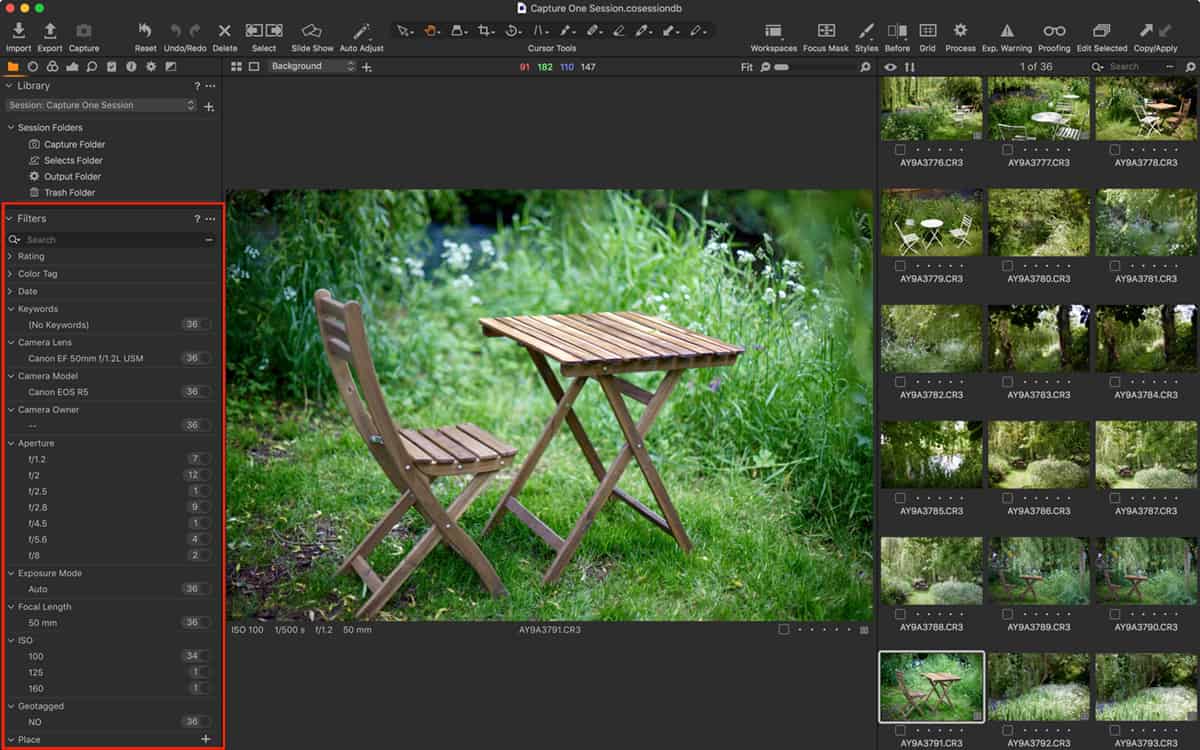
Filters are an often over-looked feature in Capture One and they’re really very powerful for searching for images. You might already use them to find starred or colour tagged images but they can...

Kevin Carter
August 17, 2021
Read More
  • Articles
  • Capture One Pro
  • Features
  • Hidden Features of Capture One
  • News

Hidden Features of Capture One: Save your Workspace

Capture One Pro is a highly customisable app, and there’s nothing worse than getting it all set up only to find the workspace has changed for whatever reason. I often find it different to how I ...

Kevin Carter
June 9, 2021
Read More
  • Capture One Pro
  • News

Capture One promises performance enhancements with native support for Apple M1 chip

Capture One has added native support for the new Apple M1 chip. Besides being a chance to rewrite the code entirely, there should also be some real performance enhancements. According to Capture One, ...

Kevin Carter
June 1, 2021
Read More
Capture One Pro in browser mode
  • Articles
  • Capture One Pro
  • Capture One Pro
  • Features
  • News
  • Tutorials

Hidden Features of Capture One Pro: Redeploy as a Fast Browser

Why use Capture One Pro as a fast browser? In theory, Capture One can’t be used to browse until images are imported into either a Catalog or a Session. And, in my opinion, it’s this design that makes ...

Kevin Carter
May 15, 2021
Read More
12345
Copyright © 2026 All rights reserved The Digital Journal of Photography | Powered by News Magazine X
Manage Consent
To provide the best experiences, we use technologies like cookies to store and/or access device information. Consenting to these technologies will allow us to process data such as browsing behaviour or unique IDs on this site. Not consenting or withdrawing consent, may adversely affect certain features and functions.
Functional Always active
The technical storage or access is strictly necessary for the legitimate purpose of enabling the use of a specific service explicitly requested by the subscriber or user, or for the sole purpose of carrying out the transmission of a communication over an electronic communications network.
Preferences
The technical storage or access is necessary for the legitimate purpose of storing preferences that are not requested by the subscriber or user.
Statistics
The technical storage or access that is used exclusively for statistical purposes. The technical storage or access that is used exclusively for anonymous statistical purposes. Without a subpoena, voluntary compliance on the part of your Internet Service Provider, or additional records from a third party, information stored or retrieved for this purpose alone cannot usually be used to identify you.
Marketing
The technical storage or access is required to create user profiles to send advertising, or to track the user on a website or across several websites for similar marketing purposes.
  • Manage options
  • Manage services
  • Manage {vendor_count} vendors
  • Read more about these purposes
View preferences
  • {title}
  • {title}
  • {title}